Stop Guessing Trip Profits on the Amazon Relay Loadboard
RelayProfitPro lives directly inside your desktop browser. It factors your exact truck overhead, circuity, driver compensation, and return deadhead directly onto every Amazon Relay load card.
How It Looks Directly on the Amazon Relay Loadboard
The desktop extension seamlessly injects custom calculation badges directly onto live Relay load board cards.
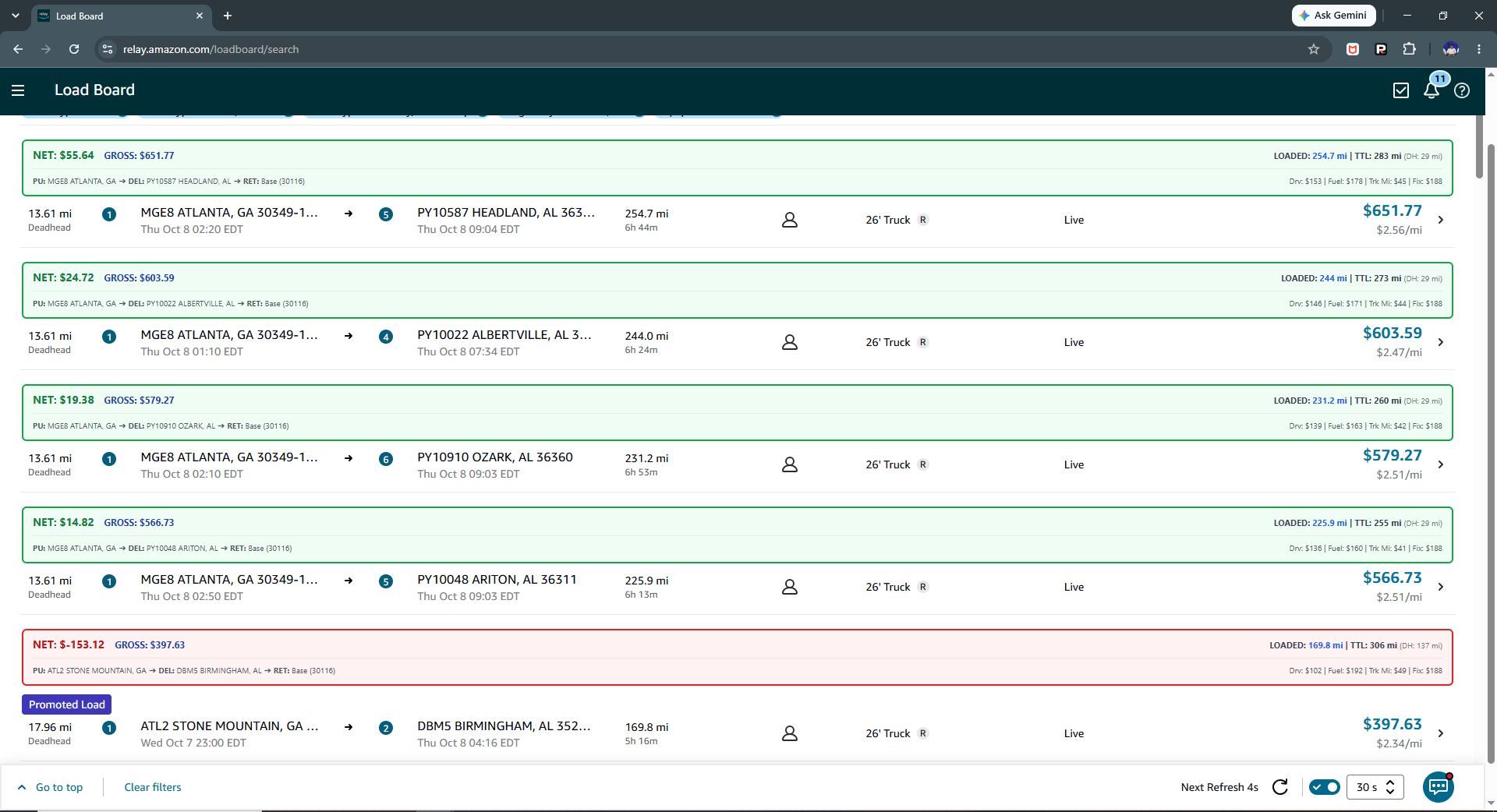
Full Loadboard Real-Time Injected View
RelayProfitPro scans loaded spot freight cards in real-time as you browse or filter lanes on Amazon Relay. Instantly flags true trip profit, total roundtrip mileage, and overhead cost before you click "Book".
How to Configure RelayProfitPro for Your Operation
Every carrier operates with different costs and equipment. Click or select any field in the configuration panel on the left to see exactly how it works and how to set it for your operation.
Base Garage ZIP Code
This is the zip code of the area where your truck is located. This is used to calculate the distance from where your truck is located to the load pick up point. This allows RelayProfitPro to accurately calculate an estimated mileage for profit calculation purposes.
Dispatch Setup Strategy
If your truck is parked at your home terminal, warehouse yard, or near an Amazon facility (e.g., 30009), enter that exact postal code so empty miles to the pickup point and home leg deadhead are estimated appropriately.
Live Load Simulator Engine
Test real Amazon Relay load scenarios against your fleet parameters to see how RelayProfitPro breaks down trip margins in real time.
Amazon Relay Live Load Simulator Real-Time Sync
Sample route loaded in Amazon Relay Loadboard format
Expense Allocation Breakdown
ATL8 → CHA2How Road/Circuity Factor Works: Amazon Relay's advertised mileage represents straight-line or transit-cleared estimates. The circuity factor (default 1.17) accounts for real-world turns, bridge detours, weigh station stops, and truck routes.
Fixed Cost Daily Proration: Weekly truck rental and insurance costs are divided by your designated Operating Days / Wk, so a load taken on a Monday carries its fair share of weekly overhead.